
High-Efficiency Desk Accessories: Physical Tools Built for High-Speed Workspaces
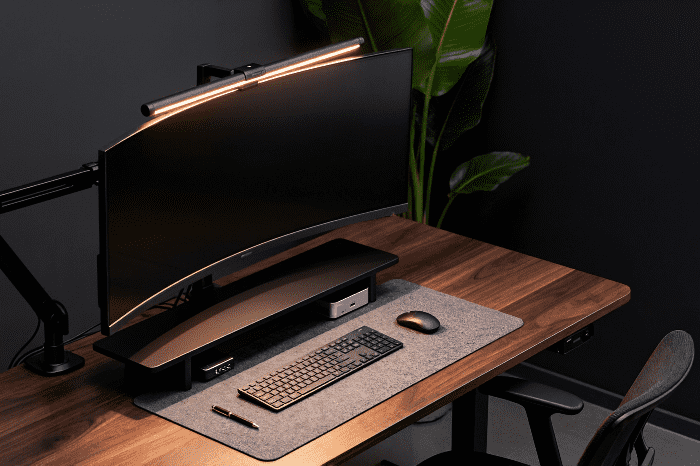
Is your multi-thousand-dollar tech setup trapped on a cluttered, cable-tangled desk? You’re losing speed and focus to physical friction without even realizing it.
Let’s talk real for a second. Most people dump hundreds of dollars into high-end monitors, hyper-fast mechanical keyboards, and ultra-quiet PC builds, only to set them on a clutter-filled, wobbly desk. Your digital reaction space—that core area where you create, trade, game, or code—is only as fast as your physical setup.
When your cables look like a nest of angry snakes, or your neck aches after twenty minutes of focus work, your gear isn’t serving you. You end up wasting precious energy fixing small annoyances instead of staying in your zone. We tested out a massive stash of modern physical desk tools to see which ones actually speed up your daily routine and which ones just take up extra space. Here is the lowdown on physical desk utilities that actually make a difference.
 |
Monitor Arms for Extra Desk Territory
 |
If your monitor still sits on the chunky plastic stand that came in the original box, you’re losing valuable space. Heavy stock bases eat up prime real estate right where your hands, notepad, or keyboard need to rest.
A solid, gas-spring monitor arm changes the dynamic of your workspace immediately.
The physical win: You lift that heavy panel entirely off the desk surface. Suddenly, you gain a massive patch of open room underneath your screen.
The ergonomic perk: Stock stands rarely lift high enough. An adjustable arm places the top third of your display right at eye level, stopping you from slouching forward like a turtle.
The real-world catch: Cheap arms wobble every single time you type fast or bump your desk. Invest in heavy-duty aluminum options with adjustable tension controls so your screen stays locked dead in place.
Moving your display effortlessly with one hand sounds like a minor detail until you experience it. Once you swing your screen out of the way to spread out paper documents, you will never go back to a static stand.
Modular Desk Shelves Build Upward
 |
A bare flat desk forces you to spread your physical items outward. That leads straight to side-to-side clutter. Modular desk shelves solve this issue by building upward.
Under Desk Cable Trays Stop Visual Noise
 |
Nothing ruins focus faster than a chaotic tangle of power bricks, display cables, and charging cords wrapping around your legs. Messy cables aren't just ugly; they make swapping out gear a complete headache.
Under-desk cable raceways combined with magnetic cable anchors offer an easy fix. You mount a steel tray right beneath the back edge of your desk to hold your surge protector and heavy power bricks out of sight.
Then, run magnetic cord clips along the back legs of your setup. Your charging lines snap right into position when you need them and stay hidden when you don't. Clearing out that cable nest instantly reduces visual distraction, giving your brain a clean slate to focus on complex tasks. If you're tackling full-room organization next, check out our guide on decluttering by selection.
Oversized Desk Pads Anchor Your Workspace
 |
If you are still using a tiny mouse pad from ten years ago, upgrade to an oversized desk pad. A massive felt, leather, or high-density micro-weave mat acts as a soft anchor for your entire setup.
A large desk pad sets clear physical limits for your gear. Your keyboard stops sliding during heavy typing sessions, mouse movements become smoother, and your desk surface stays safe from scratches and scuffs. Plus, resting your wrists on a soft layer feels far better than pressing against rough wood or glass over an eight-hour shift.
Monitor Light Bars Save Desktop Space
 |
Desk lamps eat up surface area and often cast annoying glare across your monitor screen. LED monitor light bars clamp directly onto the top rim of your display, shooting bright, directed light straight down onto your physical workspace without touching your screen.
Because the light shines down at a strict angle, it lights up your notes, keyboard, and desk tools without reflecting off your screen. Look for light bars with adjustable color temperatures. Warm lighting helps you relax during late-night sessions, while bright cool light keeps you alert during morning rushes.
The Verdict: Streamline for Speed
You don't need to buy every desk gadget on the market to build a productive setup. The goal is simple: eliminate friction. Every physical utility on your desk should earn its keep by saving you time, improving your posture, or clearing away visual clutter.
Start small. Mount your screen on a sturdy monitor arm, tuck your power cords into a hidden tray, and lay down a quality desk pad. When your physical space runs smooth and clutter-free, your mental speed and reaction times naturally follow suit.
Want to stay ahead of the curve on workspace design and gear drops? Join our weekly newsletter for fresh updates, setup breakdowns, and actionable tips delivered straight to your inbox! We also want to hear from you—what physical tool completely transformed your daily desk flow? Drop your thoughts and current setups in the comments section below!
Before you go, make sure to check out our Trendy Tech Hub, where you can get more guides and tips about workspace utilities. Ready to upgrade right now? Head over to our review and curated shop page to check out our top picks by category and grab the exact gear tested and approved for high-efficiency spaces.
 |
Certain links on this page may be affiliate links. This means OnTrendCollections may receive a small commission at no additional cost to you if you decide to make a purchase. This supports our work and enables us to continue offering free, useful content. All product imagery featured in our reviews is sourced directly from our retail partners' official websites for commentary purposes, while some graphics and design elements are created using Goart, Canva and Artspace. OnTrendCollections is not a part of, endorsed by, or in any other way connected to Facebook Inc. or Google Inc.

Tech Trend Analyst & Style Innovator
Tired of dull skin, lifeless hair, and feeling less than your best? Discover the power of nature with our free e-book on natural solutions and supplement strategies for radiant skin, hair, and overall wellness. Learn how to achieve a healthy glow from the inside out. You can click the image to avail your FREE E-book.
